Most recent UPDATE 20180412:
I saw this post today and I have found a solution some weeks ago. (which I want to share today)
Our (internal) solution is based on the Unity video tutorial with Tips and Tricks https://unity3d.com/es/learn/tutorials/topics/tips/unity-tips-tricks-3 and heavily modified for MegAgeM needs. However the code shown from the video works 99% fine and is my recommendation for you, if you have to align a lot of GameObjects with the ground.
using UnityEngine;
using UnityEditor;
using System.Collections;

public class AlignWithGround : MonoBehaviour {
	[MenuItem("Tools/Transform Tools/Align with ground %t")]
	static void AlignWithGround2() {
		Transform[] transforms = Selection.transforms;
		foreach (Transform myTransform in transforms) {
			RaycastHit hit;
			if (Physics.Raycast(myTransform.position, -Vector3.up, out hit)) {
				Vector3 targetPosition = hit.point;
				if (myTransform.gameObject.GetComponent<MeshFilter>() != null) {
					Bounds bounds = myTransform.gameObject.GetComponent<MeshFilter>().sharedMesh.bounds;
					targetPosition.y += bounds.extents.y;
				}
				myTransform.position = targetPosition;
				Vector3 targetRotation = new Vector3(hit.normal.x, myTransform.eulerAngles.y, hit.normal.z);
				myTransform.eulerAngles = targetRotation;
			}
		}
	}
}
Original Post:
We had this issue during the GlobalGameJam and I’m pretty sure that I was once able to do this directly in the editor. However I forgot the solution and have no glue anymore and so I decided to do a quick research on “how to place the flying GameObjects on the terrain or plane or ground” (See Screenshots to understand my problem here – some trees are just a few meters up the terrain).
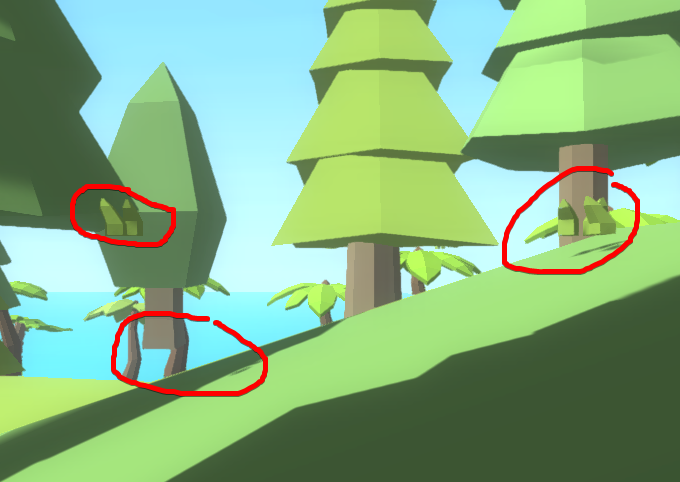
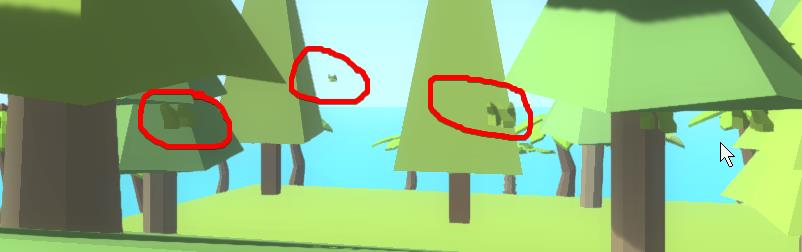
First I stumbled over an answer where someone recommends during runtime a “raycast” to what is the “ground” or “floor” in the scene.
I guess this might be a solution… But…
I also found this thread, where someone has created a JS script for usage in the Unity Editor to place the objects on the ground.
Some years later someone created a C# solution and… Someone pointed out a hotkey which seems liek the knowledge I once had and lost (see beginning of this post)
https://forum.unity.com/threads/here-is-an-editor-script-to-help-place-objects-on-ground.38186/
I will test the code in the next days and add some updates on how this worked.
Update 1:
Tested… Seems to work – but not for our scene. (Our tree models are prefabs combinated from different Objects – all of them will be checked – but this results in bad results – since the tree trunk is bellow the normal tree green and both are placed to the ground)
//source https://forum.unity.com/threads/here-is-an-editor-script-to-help-place-objects-on-ground.38186/
using System.Collections;
using System.Collections.Generic;
using UnityEngine;
using UnityEngine;
using UnityEditor;


public class DropObjectsEditorWindow : EditorWindow
{
    private bool m_bAlignRotations = true;

    // Add a menu item
    [MenuItem("Window/Drop Object(s)")]

    static void Awake()
    {
        // Get or create an editor window
        EditorWindow.GetWindow<DropObjectsEditorWindow>().Show();
    }

    void OnGUI()
    {
        EditorGUILayout.BeginHorizontal();

        if (GUILayout.Button("Drop/align selected object(s)"))
        {
            DropObjects();
        }

        EditorGUILayout.EndHorizontal();

        // Add checkbox for rotation alignment
        m_bAlignRotations = EditorGUILayout.ToggleLeft("Align Rotations", m_bAlignRotations);
    }

    void DropObjects()
    {
        Undo.RecordObjects(Selection.transforms, "Drop Objects");

        for (int i = 0; i < Selection.transforms.Length; i++)
        {
            GameObject go = Selection.transforms[i].gameObject;
            if (!go)
                continue;

            // Cast a ray and get all hits
            RaycastHit[] rgHits = Physics.RaycastAll(go.transform.position, -go.transform.up, Mathf.Infinity);

            // We can assume we did not hit the current game object, since a ray cast from within the collider will implicitly ignore that collision
            int iBestHit = -1;
            float flDistanceToClosestCollider = Mathf.Infinity;
            for (int iHit = 0; iHit < rgHits.Length; ++iHit)
            {
                RaycastHit CurHit = rgHits[iHit];

                // Assume we want the closest hit
                if (CurHit.distance > flDistanceToClosestCollider)
                    continue;

                // Cache off the best hit
                iBestHit = iHit;
                flDistanceToClosestCollider = CurHit.distance;
            }

            // Did we find something?
            if (iBestHit < 0)
            {
                Debug.LogWarning("Failed to find an object on which to place the game object " + go.name + ".");
                continue;
            }

            // Grab the best hit
            RaycastHit BestHit = rgHits[iBestHit];

            // Set position
            go.transform.position = new Vector3(BestHit.point.x, BestHit.point.y, BestHit.point.z);

            // Set rotation
            if (m_bAlignRotations)
            {
                go.transform.rotation *= Quaternion.FromToRotation(go.transform.up, BestHit.normal);
            }
        }
    }
}
Update 2:
This is a free asset pack with a model grounder in it. It’s untested, but the name sounds promissing to provide a solution for the grounding of the trees.
https://www.assetstore.unity3d.com/en/?stay#!/content/108464
However… In the Scene View it is possible to navigate through the world with WASD if the right mouse button is pressed. This is how I fixed now some of the flying trees.
